
Your clients hear you before they ever see your work. On a video call, a thin, echoey laptop microphone tells them you are working from a kitchen table with the washing machine on, even when the work itself is excellent. A dedicated USB microphone is the cheapest way to sound like the professional you are charging for, and you do not need to spend much to get there.
We checked three USB microphones that UK freelancers actually buy, judged on what matters for client calls rather than studio specs: how your voice sounds on Zoom and Teams, how much of your room leaks in, how easy the mic is to live with on a desk, and what it costs. The short answer: the FIFINE K669B is the sensible default if money is tight, the HyperX SoloCast earns its place with a tap-to-mute button you will use every day, and the Blue Yeti is the premium pick if you also record anything clients will replay. All three were available to buy on Amazon UK when we checked on 2 November 2026, and every link below takes you to the live listing so you can see the current price.
How we judged them
- Call clarity: how your voice sounds to clients on Zoom and Teams. Warmth and intelligibility matter; studio-grade detail does not.
- Room-noise rejection: every condenser mic hears the room. The question is how much of the keyboard, the street and the flatmate it lets through.
- Controls you can reach mid-call: mute and volume you can find without looking. Fumbling through software settings while a client waits is the failure mode.
- Desk footprint: freelancers work on real desks. A mic that eats half of yours, or needs a boom arm to be usable, costs more than its price.
- Price: three honest tiers, from the lowest-priced mic worth buying to the premium pick.
Microphone prices move constantly. Check the live price on Amazon UK before buying; the links below take you straight to the current listing.
Best value: FIFINE K669B
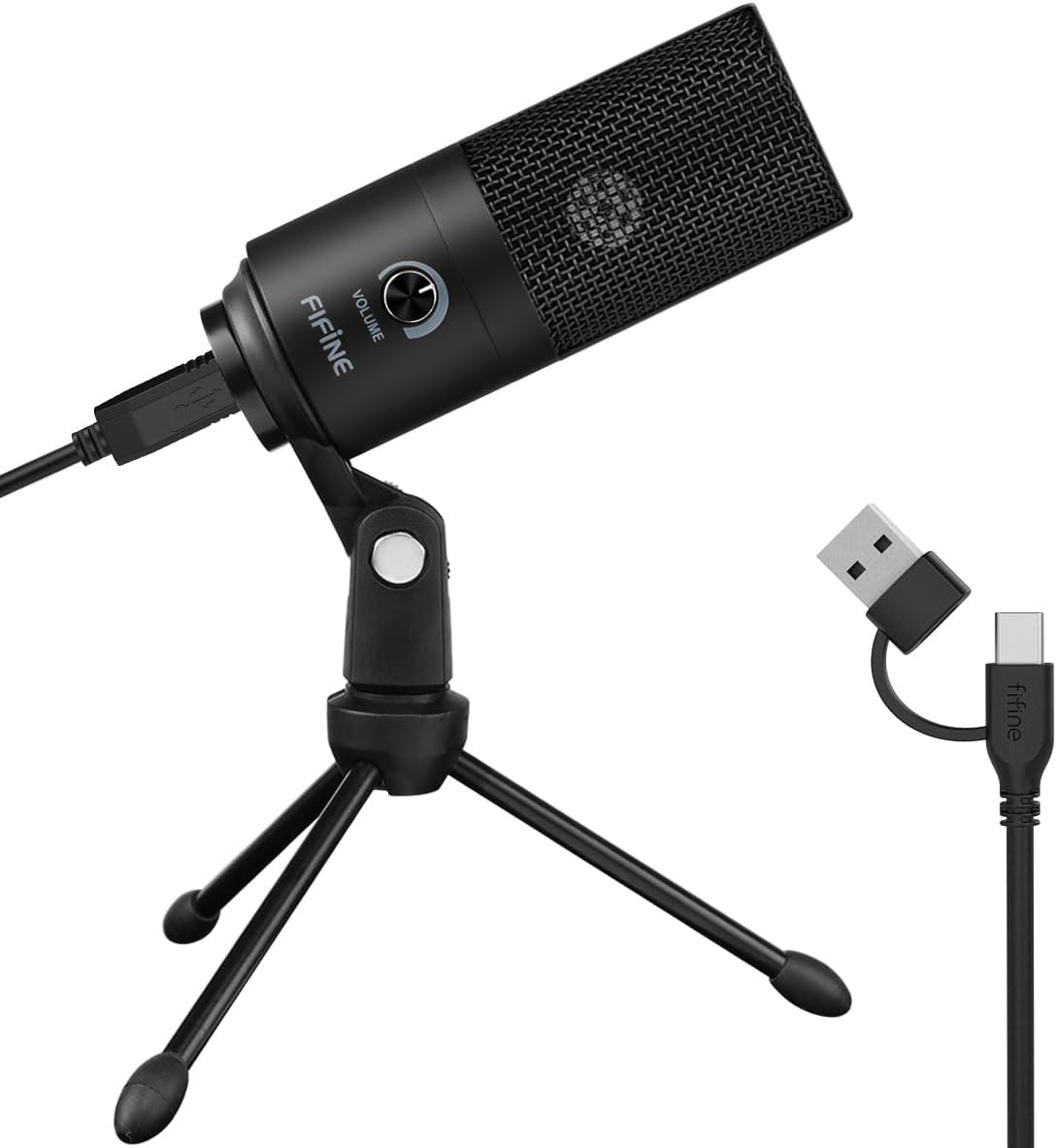
The K669B is the default budget recommendation for a reason, and that reason is simple: it is a metal-bodied cardioid condenser microphone with a volume knob and a tripod in the box, and it sounds far better than any laptop microphone for a small spend. Cardioid means it listens mostly to what is in front of it (you) and much less to what is behind it (the room), which is exactly what a freelancer on client calls needs. It records at 16-bit/48kHz across a 20Hz to 20kHz range, plugs in over USB and works on Windows and Mac with no drivers and no software to install.
Why freelancers love it: it is a small spend for a large jump in how you sound. The volume knob on the body lets you adjust your level without opening a settings menu mid-call, the metal body survives being knocked over by a cat, and the tripod keeps it stable on a crowded desk. Reviewers who test budget microphones keep coming back to it: CNN’s testing picked it as the best budget microphone, and it is one of the most recommended starter mics in creator communities. For a freelancer taking two or three client calls a week, it is the whole upgrade.
The honest drawbacks: it hears your room. A cardioid pattern helps, but this is a sensitive condenser: an echoey kitchen or a keyboard hammered two feet away will come through, and there is no mute button on the mic itself, so muting means reaching for your keyboard or the mute button in Zoom. The tripod is short, so the mic sits low on the desk unless you raise it on a stack of books, and the cable is fixed rather than detachable. It is also the least forgiving of the three if your room is noisy: in a quiet room it shines, in a loud one it reports everything.
Verdict: the rational default. If you are still on your laptop’s built-in microphone, this is the biggest upgrade per pound in this guide.
Check the current price of the FIFINE K669B on Amazon UKBest all-rounder: HyperX SoloCast
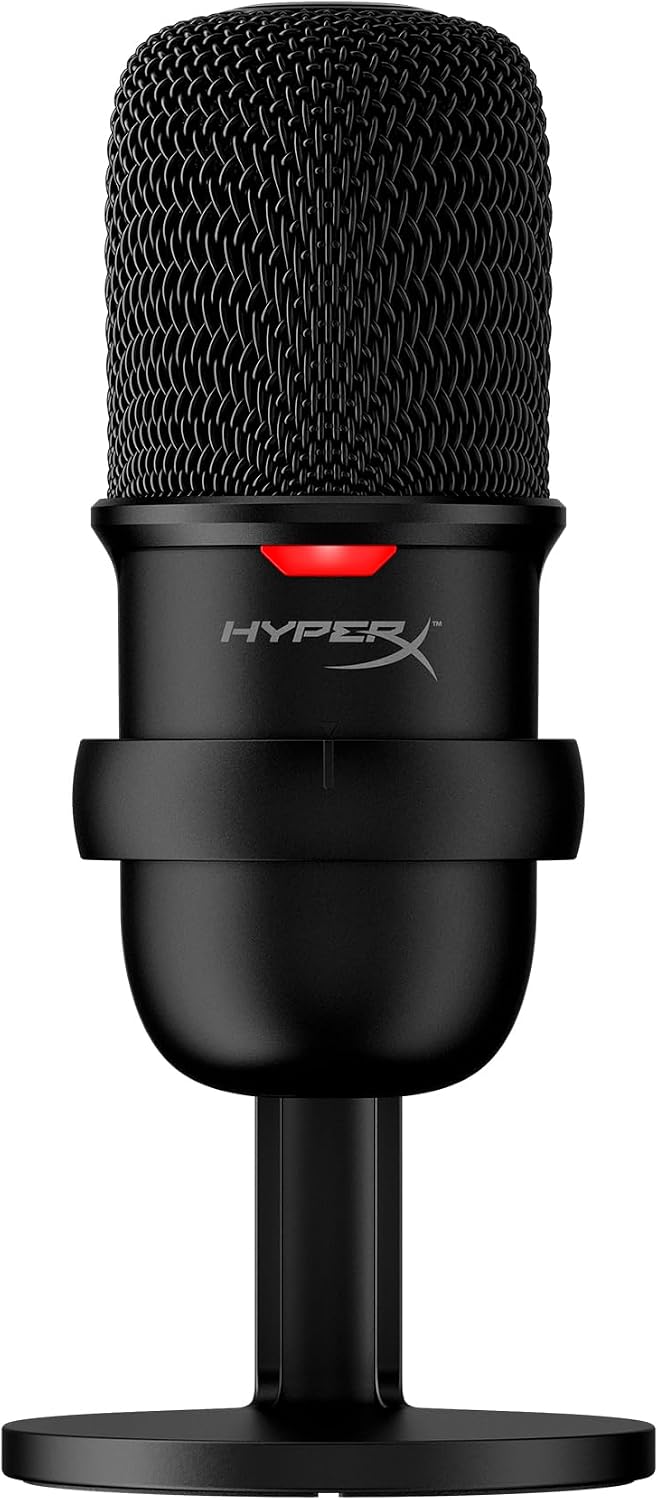
The SoloCast is the grown-up version of the budget mic: same plug-and-play idea, but with the one feature every freelancer actually uses daily. Tap the top of the microphone and it mutes, with a red LED that tells you at a glance whether you are live. That sounds small until you have coughed, answered the door, or let a dog in during a client call and needed to mute in under a second. It is a 14mm electret condenser capsule with a cardioid pattern, 20Hz to 20kHz response, and recording at up to 24-bit/96kHz, connected over USB-C with a USB-C to USB-A cable in the box.
Why freelancers love it: the mute button changes behaviour. Freelancers who own one mute constantly: before the call starts, while the client talks among themselves, whenever the kettle goes on. The LED means you never have to ask “am I muted?” again, which is a real thing that happens on real calls. It is also small and tidy on a desk, with an adjustable stand that tilts to face you, and it works with PC, Mac and PlayStation with no software required. The cardioid pattern does the usual work of favouring your voice over the keyboard behind the mic, and on paper the 24-bit/96kHz recording gives it more headroom than the K669B’s 16-bit/48kHz.
The honest drawbacks: there is no headphone jack, so you cannot monitor your own voice through the mic the way you can with the Yeti below. That only matters if you record, but it is a genuine omission at this price. There is no gain knob either: volume is set in software, which is fine once you have set it and annoying the first time. And it looks like gaming gear, because it is: the red LED and the HyperX branding will not bother most clients, but if your calls are with conservative corporate clients, the Yeti looks more at home.
Verdict: the sweet spot if you take calls every day. Tap-to-mute is the feature you will use a hundred times a week, and the SoloCast is the least expensive mic here that does it properly.
Check the current price of the HyperX SoloCast on Amazon UKBest premium pick: Blue Yeti
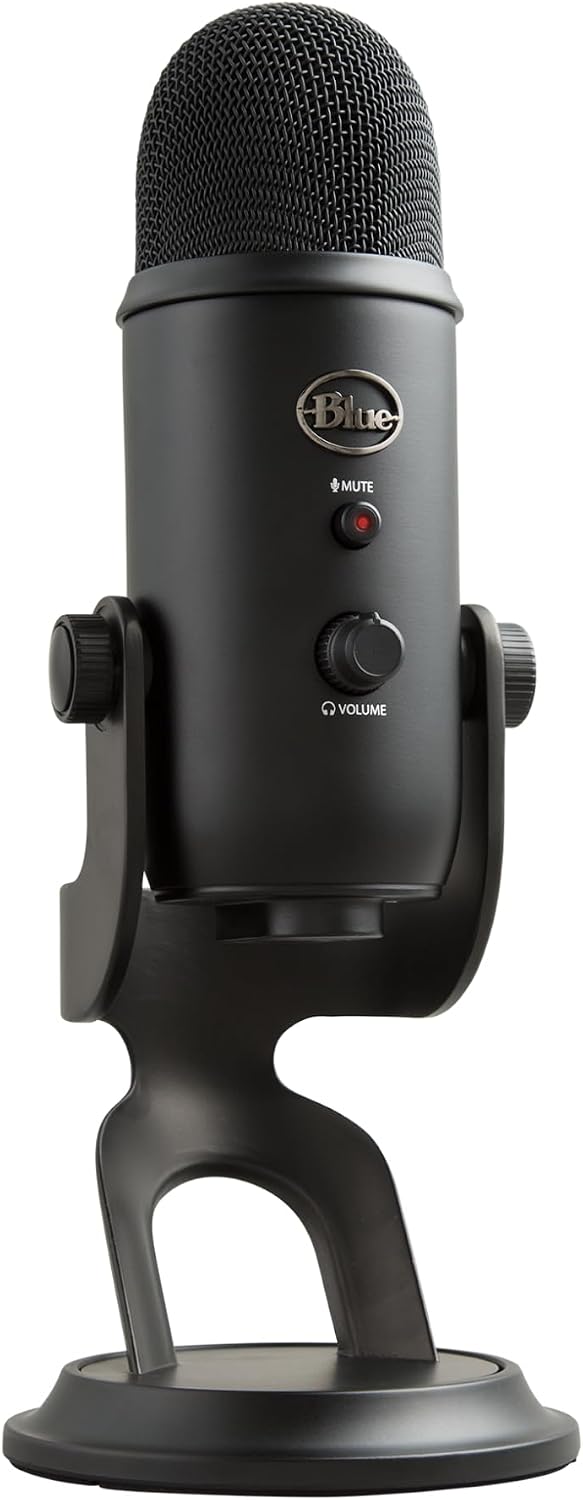
The Yeti has been the default USB microphone recommendation for over a decade, and it is still the one to beat if you want a single microphone that does everything. Three 14mm condenser capsules and four pickup patterns (cardioid, bidirectional, omnidirectional and stereo) mean it adapts to whatever you throw at it: cardioid for solo calls, bidirectional for a face-to-face interview, omnidirectional for a round-table, stereo for instruments. It records at 16-bit/48kHz, has a gain knob, a mute button and a headphone volume knob on the body, and a 3.5mm headphone jack for zero-latency monitoring of your own voice.
Why freelancers love it: it is the only mic here that covers every situation a freelancer meets. Client calls in cardioid, a recorded interview in bidirectional, a podcast with a guest sitting opposite you, a voiceover for a client video: one microphone, no extra purchases. The onboard controls mean you never touch software mid-call, and the headphone jack means you can hear exactly what the client hears, which matters the moment you record anything they will replay. It is built like a small tank, and the stand is solid enough that the mic stays where you put it.
The honest drawbacks: it is big and heavy on a desk, several times the bulk of the SoloCast, and it still connects over USB mini-B rather than USB-C, which feels dated and means one more cable type in your drawer. It is also the most sensitive to room noise of the three when the gain is set high: a condenser with three capsules hears everything, so an echoey room will show up in your audio unless you keep the gain down and sit close. And the premium tier price buys versatility you may not need: if all you do is solo client calls, the extra patterns are features you will never touch.
Verdict: buy it if you record as well as call. For pure client calls the SoloCast is the saner spend; for calls plus interviews, podcasts and voiceovers, the Yeti earns its price.
Check the current price of the Blue Yeti on Amazon UKSide-by-side comparison
| FIFINE K669B | HyperX SoloCast | Blue Yeti | |
|---|---|---|---|
| Price tier | Budget | Mid-range | Premium |
| Polar pattern | Cardioid | Cardioid | Cardioid, bidirectional, omnidirectional, stereo |
| Connection | USB | USB-C | USB mini-B |
| Resolution | 16-bit/48kHz | 24-bit/96kHz | 16-bit/48kHz |
| Mute control | None (mute in software) | Tap-to-mute + LED | Mute button |
| Headphone monitoring | No | No | Yes, zero-latency |
| Standout feature | Price + volume knob | Tap-to-mute | Four patterns + controls |
| Best for | Tight budgets | Daily calls | Calls + recording |
Which one should you buy?
- Money is tight, or you take a few calls a week → FIFINE K669B. The lowest-priced mic worth buying, and a large jump from any laptop microphone.
- Calls every day, and you mute constantly → HyperX SoloCast. Tap-to-mute with an LED is the feature that pays for itself.
- You record interviews, podcasts or voiceovers as well as calls → Blue Yeti. Four patterns and real onboard controls cover everything else.
- Noisy, echoey room → SoloCast or Yeti, kept close and with the level kept low, and mute whenever you are not speaking. A budget mic in a quiet room beats a premium mic in an echo chamber.
Buying advice: your room matters more than the mic
Before you spend anything, fix the room. A microphone records what is around it, and the difference between a budget mic in a furnished room and a premium mic in a bare one is not subtle: soft furnishings, a rug, a curtain and a closed door do more for your sound than any upgrade. Sit close to the mic, around a handspan away, and speak across it rather than directly into it to soften the popping sounds on p and b words. Then test it on a real call, not a recording: ask a friend or a client how you sound, and adjust the gain until your voice is clear without the keyboard coming through. I’ve seen a budget microphone in a carpeted spare room outclass a premium one in a tiled kitchen, and the difference was the room, not the mic.
One practical note: buy from a seller with free returns (check the returns policy on the listing before you buy). Microphone sound is personal and room-dependent: test yours on your actual calls, in your actual room, within the return window.
Frequently asked questions
Will a USB microphone work with Zoom and Teams?
Yes. All three are plug-and-play USB devices on Windows and Mac: plug them in, pick the microphone in your meeting app’s audio settings, and talk. No drivers to install for basic use. They also work with Google Meet, Skype and FaceTime.
Do I need a microphone if I already have a good headset?
For calls, a headset is fine, and a headset microphone sits closer to your mouth, which helps in noisy rooms. A desk microphone sounds fuller and more natural, and it frees you from wearing a headset all day. If you already own a good headset, a desk mic is an upgrade in sound quality, not a necessity. If you record anything, the desk mic wins clearly.
USB or XLR: which should a freelancer buy?
USB, unless you already own an audio interface. XLR microphones need an interface or mixer between the mic and the computer, which adds cost, cables and setup. Every microphone in this guide is USB and works the moment you plug it in. XLR only makes sense if you are building a recording setup and already know why you want it.
Do I need a pop filter or a boom arm?
Not to start. Sitting slightly off-axis and keeping a handspan of distance does most of what a pop filter does. A boom arm helps if your desk is crowded or the tripod puts the mic too low. Buy the microphone first, use it for a week, and only then decide what else you need.
Which microphone is best for a noisy home?
None of these will silence a noisy home on their own: they are all condenser microphones, and condensers hear the room. The practical answer is a combination: sit close, keep the level low, close the door, and mute whenever you are not speaking. The SoloCast’s tap-to-mute makes that last part easy, which is why it is the pick for noisy households. If your room is genuinely loud all day, a headset microphone or a dynamic microphone is the next step up, and that is a different guide.
More home-office guides
- Black Friday 2026: the freelancer’s home-office deal guide
- Best noise-cancelling headphones for freelancers
- Best webcams for freelancers
- Best portable monitors for freelancers
Sources
- FIFINE K669B: specifications from the FIFINE official product page (fifinemicrophone.com) and Amazon UK product listing (checked 2 November 2026; listing confirms in stock with a normal buy box)
- HyperX SoloCast: specifications from the HP/HyperX official product page and Amazon UK product listing (checked 2 November 2026; listing confirms in stock with a normal buy box)
- Blue Yeti: specifications from the Logitech user guide and Amazon UK product listing (checked 2 November 2026; listing confirms a normal buy box)
- Amazon UK product listings (checked November 2026; always verify the current price on the product page before buying)